Advance?

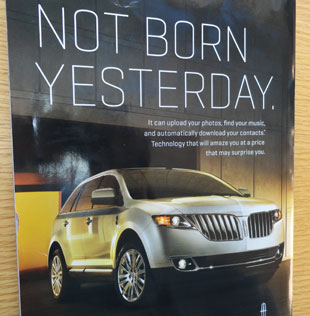
MyLincoln Touch adLin­coln is mov­ing for­ward with their tech­nol­ogy. The on-board MyLin­coln Touch sys­tem has all kinds of things that your internet-connected home com­puter offers: the abil­ity to upload pho­tos, find music, and sync your contacts.

The prob­lem is that many of those things should only be done when you are parked. And they would all be done much eas­ier on an iPad. The $400 cost is not much less than an iPad, and you can use an iPad in far more places than your Touch system.

Park your car, queue up the songs you want, plug your iPad or iPod into your car stereo — and then drive. You don’t need pho­tos or con­tacts in your car’s com­puter anyhow.

If you’re in the mar­ket for a new Lin­coln MKX, maybe con­sider a used Acura MDX or Honda Pilot for a third of the price and an iPad for each mem­ber of your fam­ily (or for sev­eral of your friends).

This ad appeared on the back cover of the Sep­tem­ber 2011 Auto­mo­bile magazine.

Apple Design decisions

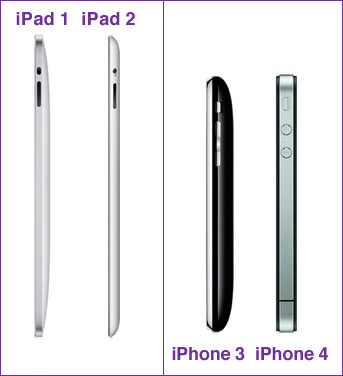
I’ve always thought it was strange that Apple went in oppo­site direc­tions for their iPad and iPhone lines.
Ver­sion 1 of the iPad has rec­tan­gu­lar edges. Ver­sion 2 has a clamshell design.

The iPhone? Ver­sion 3 has a clamshell design. Ver­sion 4 has rec­tan­gu­lar edges.

Apple is going diver­gent direc­tions with these two prod­uct lines.

Pref­er­ence for me? I like the clamshell.

They are selling a lifestyle

lifestyle-ipadOne evening, I watched all of Apple’s iPad videos. But then, I’m a fan­boy, so it was fun.
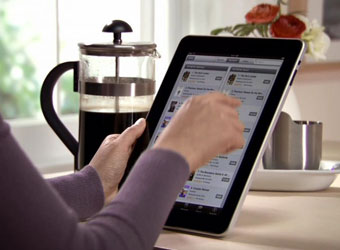
I noticed a few things — none of the mod­els were older than about 32. I remem­ber see­ing a kid in only one. The rooms that each video was shot in were per­fect. The mod­els rep­re­sented a lit­tle politically-correct eth­nic diver­sity. (I think the mix was fairly close to what their real life buy­ers might be — maybe the videos were a lit­tle heavy on the African-American side.)

None of this was sur­pris­ing to me.

Apple is sell­ing a lifestyle. “If you buy an iPad, you will look like this.”

Don’t buy that. (But if you can afford it and can actu­ally use one, do buy an iPad. Or at least buy and use a cof­fee press.)

And finally, since today is earth day, I would ask you to con­sider not buy­ing that next “thing” on your list, whether it’s an iPad or a cof­fee press. Instead, use the thing you already have and make it work. That choice will be very green, if you care about such matters.

I lied

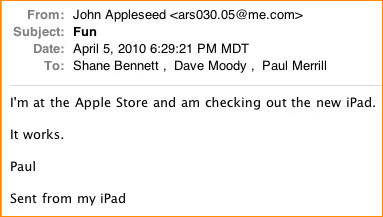
ipad-emailWell, not really.

But I was not able to stay away from the iPad. No, I didn’t buy one. But I did visit the Apple Store last night (sep­a­rate from the open­ing day, when I did not go in the store, as pre­vi­ously reported). My sons and I tried out the iPad. We all liked it a lot!

A few observations:

- It would not rotate from land­scape to por­trait in some apps. (The rota­tion lock switch could have been turned on and I didn’t know it. I dis­cov­ered its exis­tence after leav­ing the store.)

- The inter­face was not intu­itive on Pages (the Word equiv­a­lent). I couldn’t find tools in the page view.

- The key­board takes some get­ting used to. If I bought one, I’d grab a blue­tooth key­board right away.

- I guess I’m used to the tra­di­tional Mac inter­face — not hav­ing access to the Finder would take some get­ting used to. (I do a lot with files.)

Advan­tages of Amazon’s Kin­dle? You can read it in direct sun­light. It has longer bat­tery life. More titles are avail­able. Every­thing else? iPad.

I had fun mak­ing my site the home page for Safari on some of the demo units. (My web­site hits will go up arti­fi­cially till the store per­son­nel fix that.) Also, one of my sons made the screen back­ground on some of the demo units look like a page filled with app icons — stealth lit­tle trick! Alas, though — the Apple Store resets them every morn­ing, so our lit­tle tricks lasted just a few hours.

Ver­dict? It looks like a great new toy (and use­ful work device, for many). If I could afford one, I’d add it to my toy chest. Alas, not for a while! And finally, David Pogue has a great FAQ page on the iPad here. And don’t for­get to check out the great explana­tory videos on the Apple site.

The scent of an iPad

ipad-launchI vis­ited the near­est Apple Store just before Saturday’s launch of the iPad.

I should clar­ify — I went to see how long the line was, a half an hour before the open­ing, so I could take this photo for you. Then I left.

What for? Some­how being that close to the launch was enough for me.

I can’t explain why.

(By the way, the secu­rity guard said some peo­ple had been wait­ing in line since around mid­night, the night before.)

iPad review

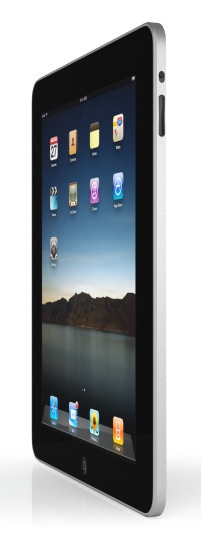
ipadYes, Apple’s iPad was released yesterday.

I think it will sell a mas­sive amount. Basi­cally, it’s a Kin­dle, an iPod Touch, and a keyboard-less* Mac­Book, all rolled into one. It has a much pret­tier inter­face than the Kin­dle. You can do any­thing that requires the inter­net when you have a wifi con­nec­tion — or if you don’t (and spend more), you can do it cellular-ly via AT&T (in some parts of the USA). It sounds like there will be a rea­son­able deal on that too — $30 for one month’s unlim­ited data service.

Some of the apps look to be pushed even fur­ther than their Mac or iPhone equiv­a­lents. And they are rea­son­ably priced ($30 instead of $79 for the full iWork suite).

Prices range from $499 to $829, depend­ing on stor­age capac­ity (16–64 gb) and whether you add the 3G inter­net con­nec­tion capa­bil­ity. Sounds like a deal to me — for what you get! Avail­abil­ity? “Sign up here, and we’ll con­tact you when iPad is avail­able to order.” (Could be two weeks. But I’d guess a month-and-a-half.)

For me? I won’t be get­ting one any­time soon, because I can’t afford it — and because I’m too shy to be that cutting-edge. But if some­one gave me one? I’d suck up my pride and set­tle for being that cut­ting edge.

(Photo from the Apple site.) *You will be able to get an exter­nal key­board — but it will prob­a­bly cost some­thing out­ra­geous like $79.